Connect the AI apps you use and the systems you already have
Built on open standards (MCP and REST), so any AI app that speaks MCP can connect. Available now with Claude Code and Claude Desktop; ChatGPT, Gemini, Copilot, Cursor and others are in testing.
Where your people and agents connect from
| AI app or client | How it connects | Status |
|---|---|---|
| Claude Code | Verified today. Plugin and command-line helper available. | Available now |
| Claude Desktop | Verified today. | Available now |
| Bots and digital workers | Connect with API keys. Each bot has its own identity and a human sponsor. | Available now |
| Your own applications | REST API described in OpenAPI 3.1. | Available now |
| ChatGPT, Gemini and Copilot | Any MCP- or REST-capable AI app can connect. Built and being validated. | In testing |
| Cursor, Codex, Gemini CLI and Cline | Coding tools connect through MCP or REST. Built and being validated. | In testing |
| Local models | Models you run yourselves can connect the same way. Built and being validated. | In testing |
| Claude on the web and mobile | Built and being validated. | In testing |
| The AI Hive on your phone | The web console installs from the phone browser on Android and iPhone, with opt-in push notifications. No app-store download. | Available |
The AI Hive does not depend on one model or vendor. People are not forced onto one brand of laptop or email client, and your AI memory should not be locked to one model either. Change AI vendor, or use several at once; what your organisation has learned stays yours.
Built and in testing. Anything that does not pass testing will be removed.
Read-only connectors that never write back
Connectors read from outside systems and feed proposed facts into an approval queue. By design, The AI Hive never writes into outside systems.
| System | Behaviour | Status |
|---|---|---|
| Jira Cloud | Read-only. Proposed facts go to an approval queue. | Available now |
| PostgreSQL views | Read-only. Proposed facts go to an approval queue. | Available now |
| IMAP mailboxes | Read-only. Chosen folders only, with the sender domain verified. | Available now |
| Git repository addresses | Mapped to projects. The code itself is not read. | Available now |
| Microsoft 365 (mail, Teams, drives) | Built, and being connected and tested. | In testing |
| Google Drive | Built, and being connected and tested. | In testing |
| GitHub | Built, and being connected and tested. | In testing |
Connect each system once, for everyone
Every connector a person switches on in their AI app adds its tool definitions to every request and passes raw data to the model, outside any company rules. Connected once to The AI Hive, a system is read on your server, reviewed, and served to every AI app as one budgeted, governed context.
+3,139 tokens
added to every request by six idle mail, drive, calendar and document connectors in a measured Claude Code test, before any of them was used.
~23,400 tokens
when one mail connector's 30 tools load, and up to 25,000 more for a single result. An AI Hive context pack stays within the budget you set per app (500 to 100,000 tokens).
About −66%
tokens processed in a simulated developer day when connectors are switched on only for the tasks that need them, instead of always on.
| Source | Connector in each person's AI app | Through The AI Hive |
|---|---|---|
| About 30 tools (~23,400 tokens) once loaded; raw messages, including untrusted inbound mail, go straight to the model. | Chosen IMAP folders, sender domain verified, facts to an approval queue. Available now Microsoft 365 mail: In testing | |
| Files and drives | About 11 tools (~5,800 tokens) once loaded; whole documents in results, with no client walls. | Google Drive and Microsoft 365 drives, read on your server. In testing |
| Tickets and records | Separate tools in every app and for every person; results are not filtered by client or scope. | Jira Cloud and PostgreSQL views, read-only, facts to an approval queue. Available now |
| Calendar and personal tasks | Personal, not company knowledge. | Not part of company memory. Keep the connector off and switch it on only for the task that needs it. |
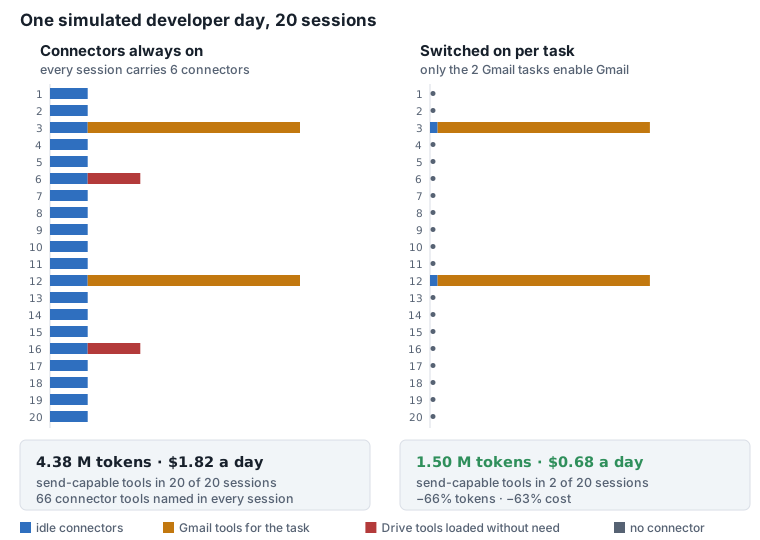
Recommended set-up: once a system is connected to The AI Hive, switch off the matching connector in people's AI apps, and keep other connectors off by default, switching them on per task. The AI then sees one small, stable set of memory tools, and private data, untrusted content and a send button no longer sit in the same agent.
Figures from a test on Claude Code 2.1.296 (13 October 2026) and a simulation with stated assumptions; method and sources in our research note What connectors cost. Side-by-side view: Why The AI Hive; security view: Security.
11 MCP tools and a REST API
AI apps use eleven MCP tools to fetch context, search, save, update, delete, refresh, request changes, check on requests, save session summaries and list the scopes they can see. A REST API, described in OpenAPI 3.1, covers everything else.
People sign in with OAuth 2.1, using a password plus an authenticator code. Access tokens are short-lived. Every call is permission-checked and recorded.
Available now
memory_get_context memory_search memory_save memory_update memory_delete memory_refresh memory_request_change memory_request_status memory_save_session_summary memory_list_scopes resource_lookup
Example MCP configuration
Illustrative only. The URL is a placeholder, and exact steps for your client are provided during the pilot.
{
  "mcpServers": {
    "the-ai-hive": {
      "type": "http",
      "url": "https://your-hive-host/mcp"
    }
  }
}What an AI app receives when it connects
The AI Hive gives the model a short, fixed list of memory tools and one context pack sized to the budget you set for that app.
Tell us which AI apps and systems matter most
In the scoping workshop we agree which one or two systems and which AI apps to connect first.